
When customers compare GNSS receivers, the first questions are usually about accuracy, update rate, waterproof rating, chipset, or satellite support. Those details matter, but for system integration there is another question that often decides whether the receiver will work on day one: How will the GNSS data physically connect to your system?
For industrial and embedded applications, the answer is often RS-232 or TTL/UART. Both can carry standard GNSS serial data such as NMEA output, but they are not the same electrical interface. Choosing the wrong one can mean no data, unstable communication, or a damaged input circuit.
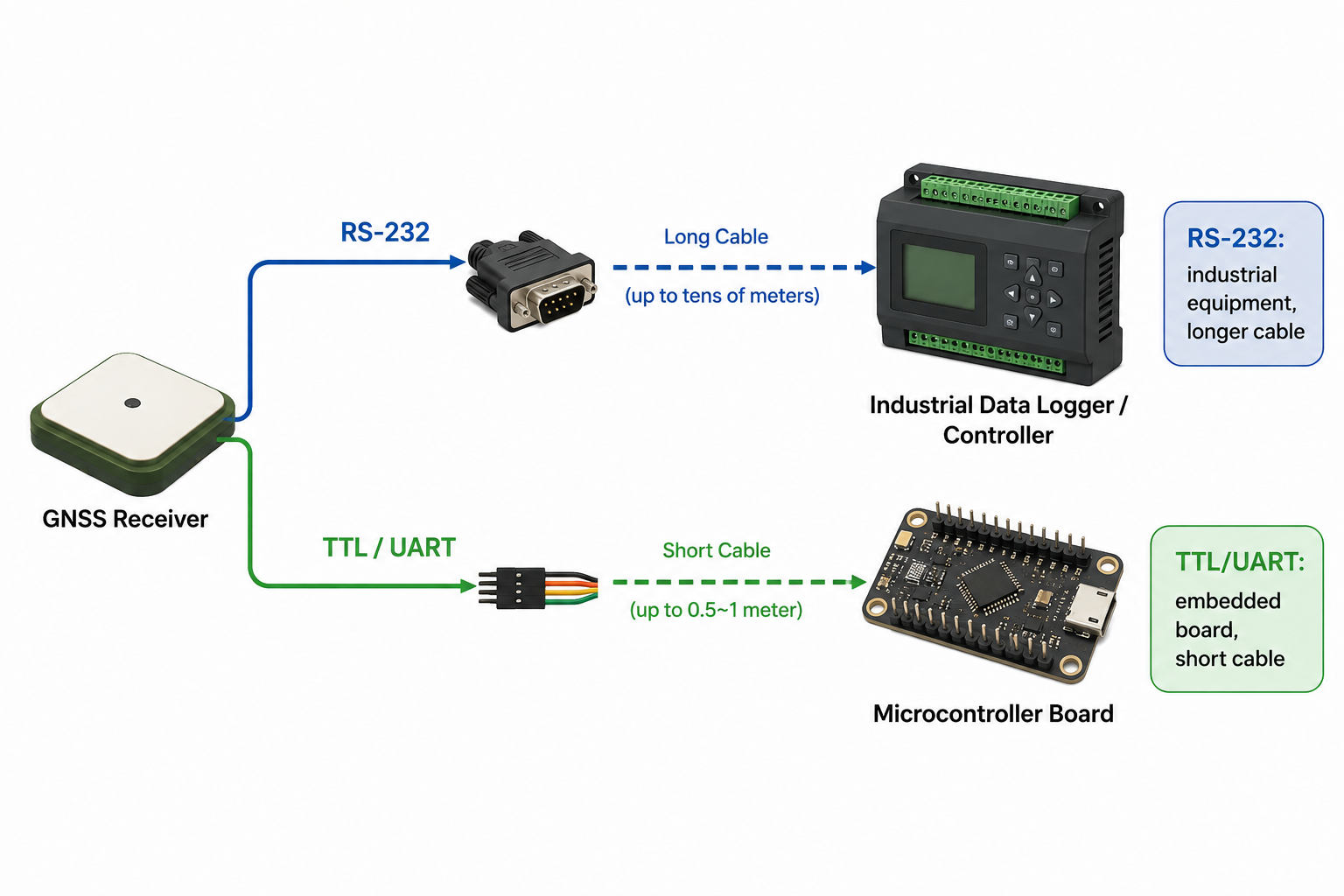
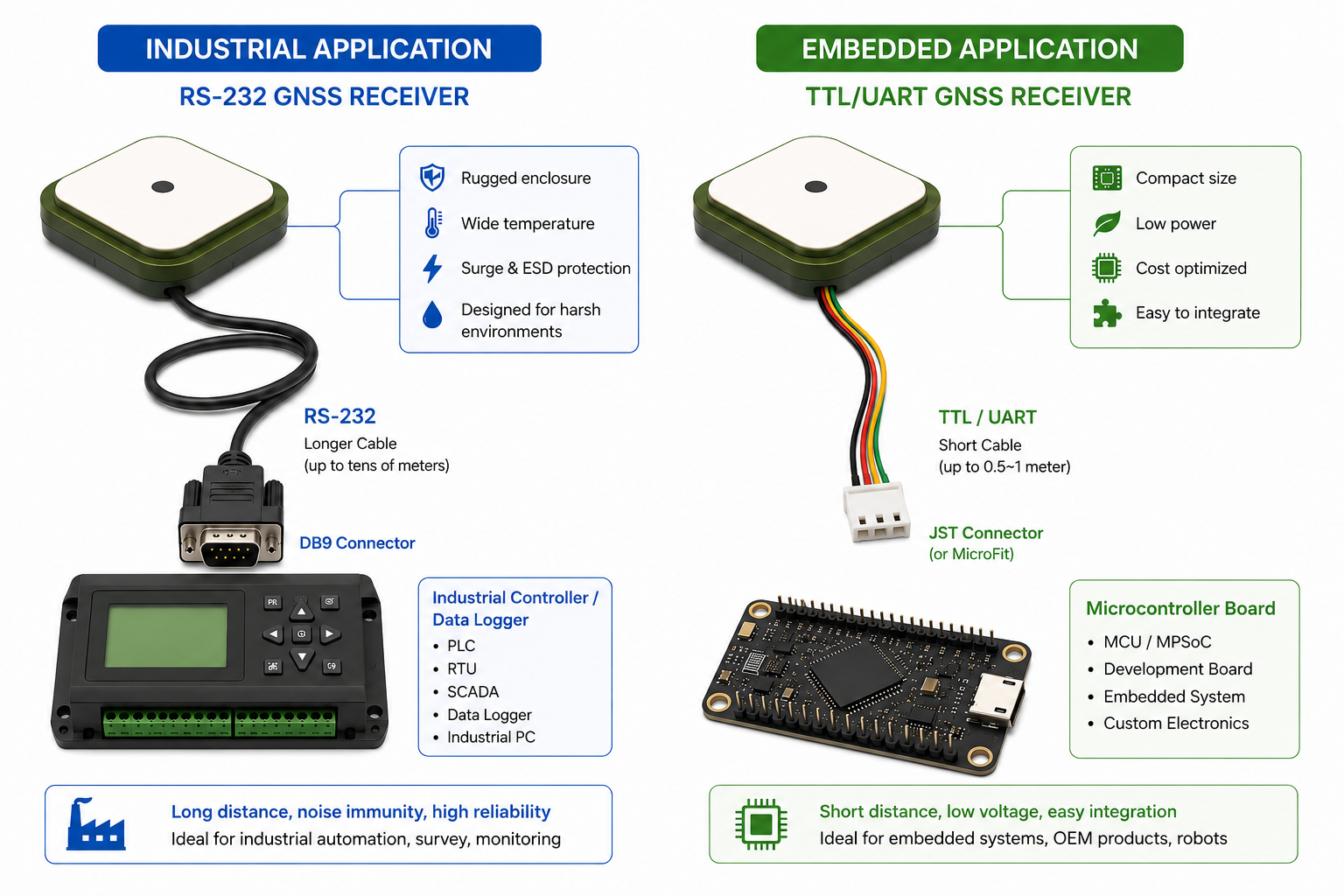
Quick rule of thumb: choose an RS232 GNSS receiver for industrial equipment, data loggers, controllers, vehicle systems, or longer cable runs. Choose a TTL GNSS receiver or TTL UART GNSS receiver when connecting directly to a microcontroller, embedded board, custom PCB, robotics platform, or IoT device.

This guide walks through the practical differences between RS-232 and TTL, how connector types fit into the picture, and what to confirm before ordering.
Why This Difference Matters
Many connection problems happen because customers focus on the connector shape instead of the electrical interface behind it.
For example:
- A customer buys a TTL receiver, but the target system expects RS-232 input.
- A customer sees an RJ45 connector and assumes it can plug into an Ethernet port.
- A customer sees a DB9 connector and assumes the signal must be RS-232.
- A customer checks the connector type but forgets to confirm VCC, GND, TX, RX, voltage level, and pinout.
These mistakes can lead to no communication, unreliable data, extra adapters, or device damage. The key idea is simple:
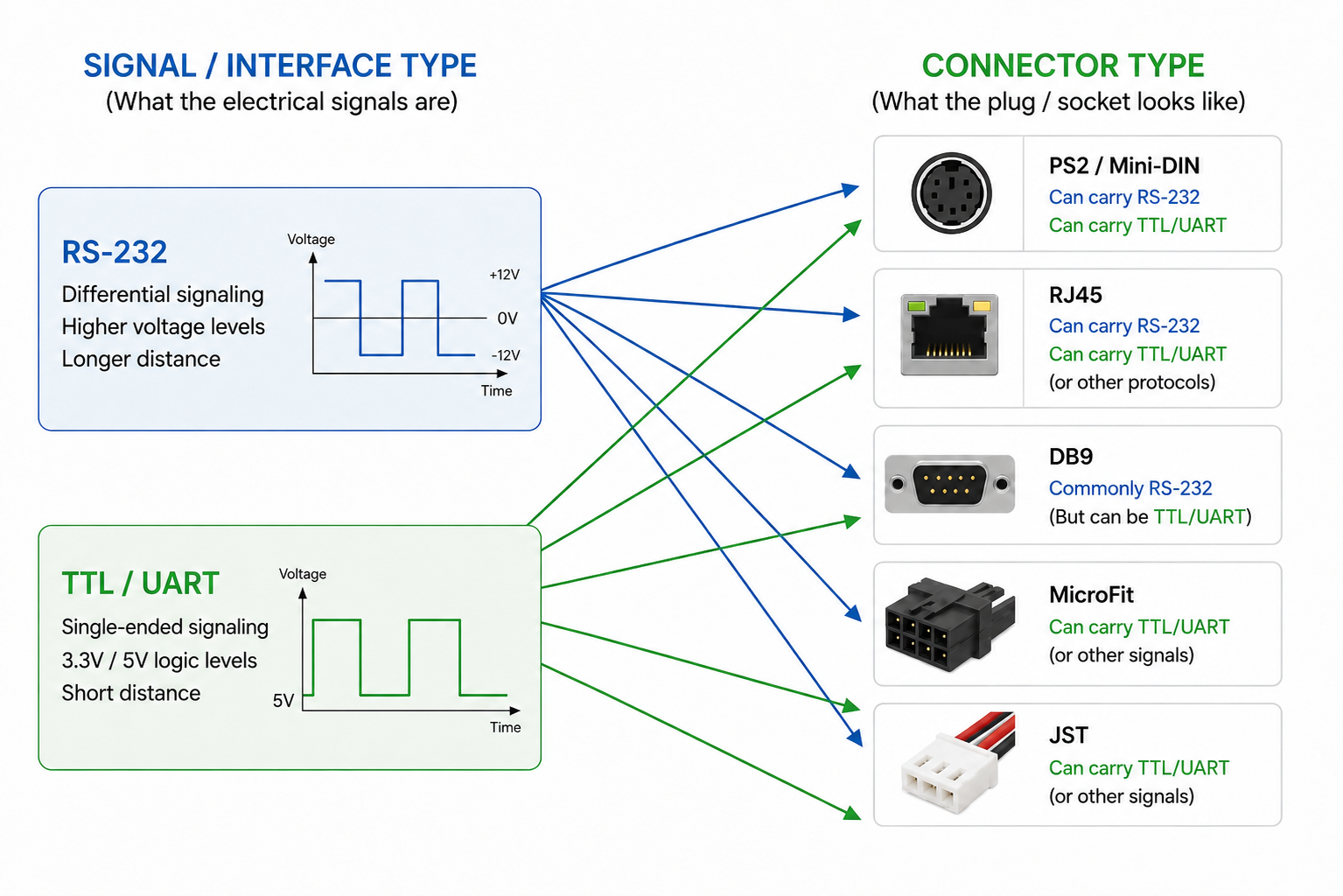
RS-232 and TTL describe the electrical signal/interface type. PS2, RJ45, DB9, MicroFit, and JST describe the physical connector type.
The connector is the plug shape. The interface type tells you what electrical signal is being carried.
What Is RS-232?
RS-232 is a long-established serial communication standard commonly used in industrial, commercial, marine, vehicle, and legacy equipment. Compared with TTL, RS-232 uses different voltage signaling and is generally more suitable for longer cable runs and electrically noisy environments.
An RS232 GNSS receiver is often used with:
- Industrial computers
- Data loggers
- Controllers
- Fleet management systems
- Marine or vehicle electronics
- PLC or control equipment
- Mapping and navigation platforms
- Windows or Linux systems using a serial adapter
GPSWebShop offers several RS232 GNSS / GPS receivers, including models such as the Navisys GR-M02 RS232, Navisys GR-U01 RS232, and Navisys GR-8018R 50Hz RS232 GNSS Receiver. These are designed for applications where reliable wired serial communication is required.
Advantages of RS-232
RS-232 is popular in industrial GNSS receiver applications because it is robust and familiar. It is usually a better choice for longer cables than TTL, and it is commonly supported by industrial equipment, data loggers, and control systems.
It is also a practical choice when the host device already has an RS-232 serial input. In that case, integration can be straightforward once the baud rate, NMEA messages, and pinout are confirmed.
Limitations of RS-232
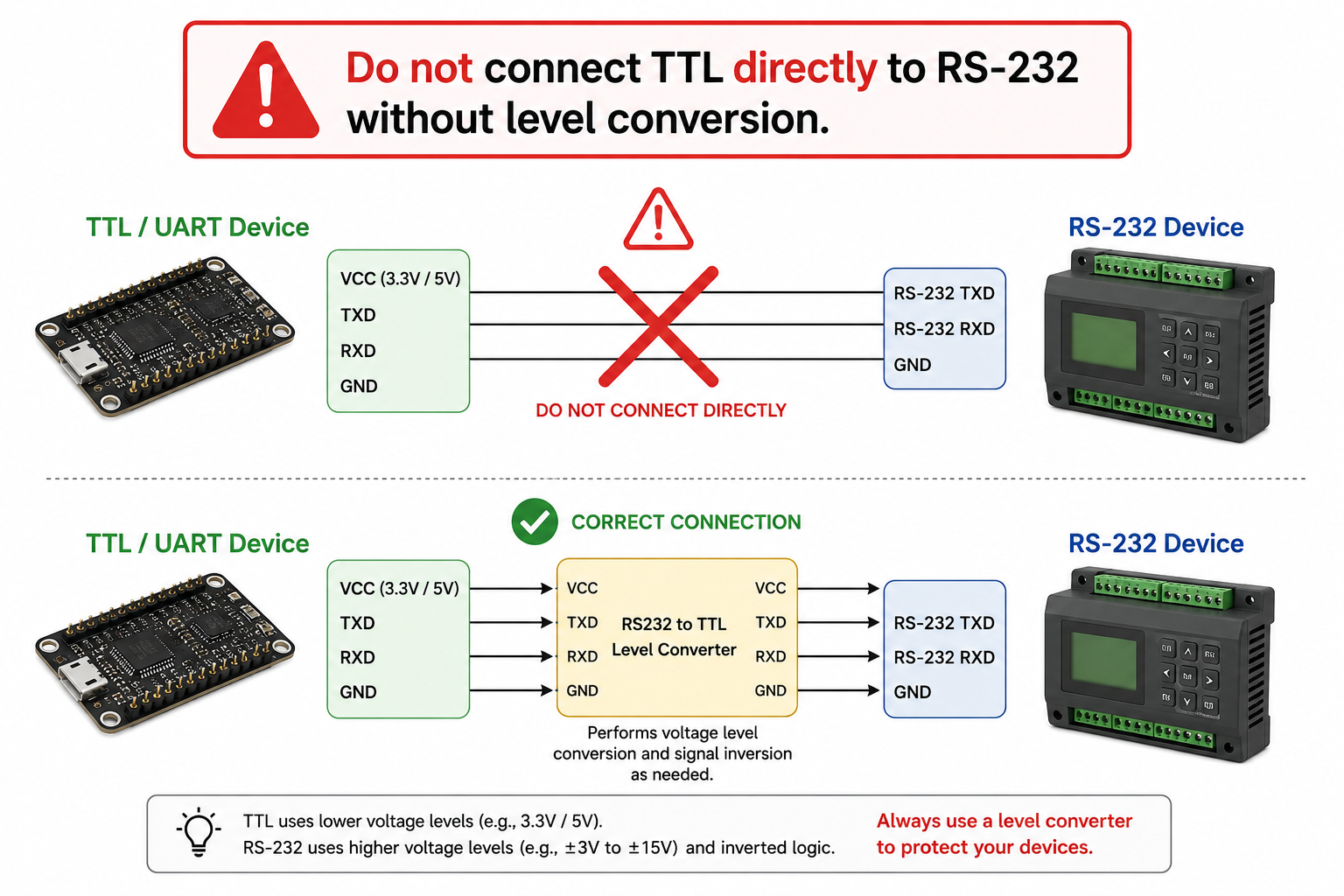
RS-232 should not be connected directly to microcontroller UART pins. The voltage levels are different from TTL logic levels and may damage a TTL device.
Modern computers usually do not include a built-in RS-232 port, so testing or logging data on a PC may require a USB to RS232 adapter. If your host device only accepts TTL/UART, you will need an RS232 to TTL level converter.
What Is TTL / UART?
TTL serial, often described as TTL/UART, is logic-level serial communication. It is commonly used inside embedded electronics and hardware integration projects. TTL voltage levels are often 3.3V or 5V, depending on the device, so voltage compatibility must always be checked.
A TTL GNSS receiver is often used with:
- Microcontrollers
- Arduino, Raspberry Pi, and other development boards
- Embedded boards
- Custom PCBs
- Robotics systems
- IoT devices
- Short internal cable runs
- Low-power electronics
GPSWebShop’s TTL / UART GNSS / GPS receiver category includes products such as Navisys GR-M02S TTL, Navisys GR-U01T TTL, Navisys GR-8018T 50Hz TTL, and Columbus P-70 Ultra Precise GNSS Receiver.
Advantages of TTL
TTL is simple and efficient for embedded electronics. If the voltage levels match, TTL can often connect directly to a microcontroller UART interface. It is compact, low power, and well suited for short internal wiring in custom products.
For embedded GNSS receiver projects, TTL/UART is often the cleanest choice because it avoids unnecessary level conversion when the host board already uses logic-level serial communication.
Limitations of TTL
TTL is not ideal for long cable runs or electrically noisy environments. It is also not plug-and-play with most PCs. To connect a TTL GNSS receiver to a computer for testing, logging, or configuration, you usually need a USB to TTL adapter.
Do not connect TTL directly to RS-232. The voltage levels are different and may damage the device.
RS-232 vs TTL Side-by-Side Comparison
| Topic | RS-232 GNSS Receiver | TTL / UART GNSS Receiver |
|---|---|---|
| Signal/interface type | RS-232 serial | Logic-level UART serial |
| Voltage level | RS-232 voltage signaling | Usually 3.3V or 5V logic level |
| Typical host device | Industrial computer, data logger, controller, vehicle system | Microcontroller, embedded board, custom PCB, robotics system |
| Typical use case | Industrial GNSS receiver integration, longer cable runs, field equipment | Embedded GNSS receiver projects, short internal wiring, development boards |
| Cable distance | Better for longer cable runs | Best for short cable runs |
| Noise immunity | Generally better than TTL | More sensitive to electrical noise |
| PC compatibility | Usually needs USB to RS232 adapter | Usually needs USB to TTL adapter |
| Microcontroller compatibility | Requires RS232 to TTL level converter | Can connect directly if voltage and pinout match |
| Common customer type | Industrial users, system integrators, fleet/marine/vehicle applications | Embedded engineers, robotics developers, IoT designers |
| Risk if connected incorrectly | Can damage TTL inputs if connected directly | Can be damaged by RS-232 voltage |
| Example products | Navisys GR-M02 RS232, Navisys GR-U01 RS232, Navisys GR-8018R RS232 | Navisys GR-M02S TTL, Navisys GR-U01T TTL, Navisys GR-8018T TTL, Columbus P-70 |
Which One Should You Choose?
Choose RS-232 if your system has an RS-232 serial input, if the cable run is longer, or if the receiver will be used in an industrial or electrically noisy environment. RS-232 is also a good fit for data loggers, controllers, fleet systems, marine systems, vehicle electronics, and many legacy or professional platforms.
Choose TTL/UART if you are connecting directly to a microcontroller, development board, embedded board, or custom PCB over a short distance. TTL is often the better fit for robotics, IoT devices, compact electronics, and low-power embedded systems.

Choose USB if your main goal is to connect the receiver to a Windows or Linux computer for testing, logging, mapping software, or configuration.
Choose Bluetooth if wireless convenience matters more than the reliability of a hardwired connection.
NMEA Output: Interface Type Is Not the Same as Data Content
RS-232 and TTL describe how data is electrically transmitted. They do not necessarily define what GNSS data is available.
Many GNSS receivers can output standard NMEA sentences over either RS-232 or TTL. Common NMEA messages include:
- GGA for fix data
- RMC for recommended minimum navigation data
- GSA for GNSS DOP and active satellites
- GSV for satellites in view
- VTG for course and speed over ground
- TXT for receiver text messages
In other words, when choosing RS-232 vs TTL, you are mainly choosing how the GNSS data reaches your host device, not whether the receiver has GNSS data.
The actual NMEA sentences, baud rate, update rate, and default configuration still depend on the specific model and settings. Always check the product specification if your application requires certain messages such as GGA and RMC at a specific update rate.
Output Type vs Connector Type
This is one of the most common sources of confusion.
RS-232 or TTL is the communication language and electrical format. The connector is only the plug shape. The pinout tells you what each pin does.

The same connector type can carry different signals depending on the product configuration. For example:
- A DB9 connector often suggests RS-232, but you should still verify the pinout.
- A JST connector is common in embedded electronics, but that does not automatically guarantee every signal is TTL.
- An RJ45 connector on a GNSS receiver may look like Ethernet, but it may simply carry power, TX, RX, and GND.
Do not assume that connector shape defines the interface type. Always check the product specification and pinout.
Common Connector Types on GNSS Receivers
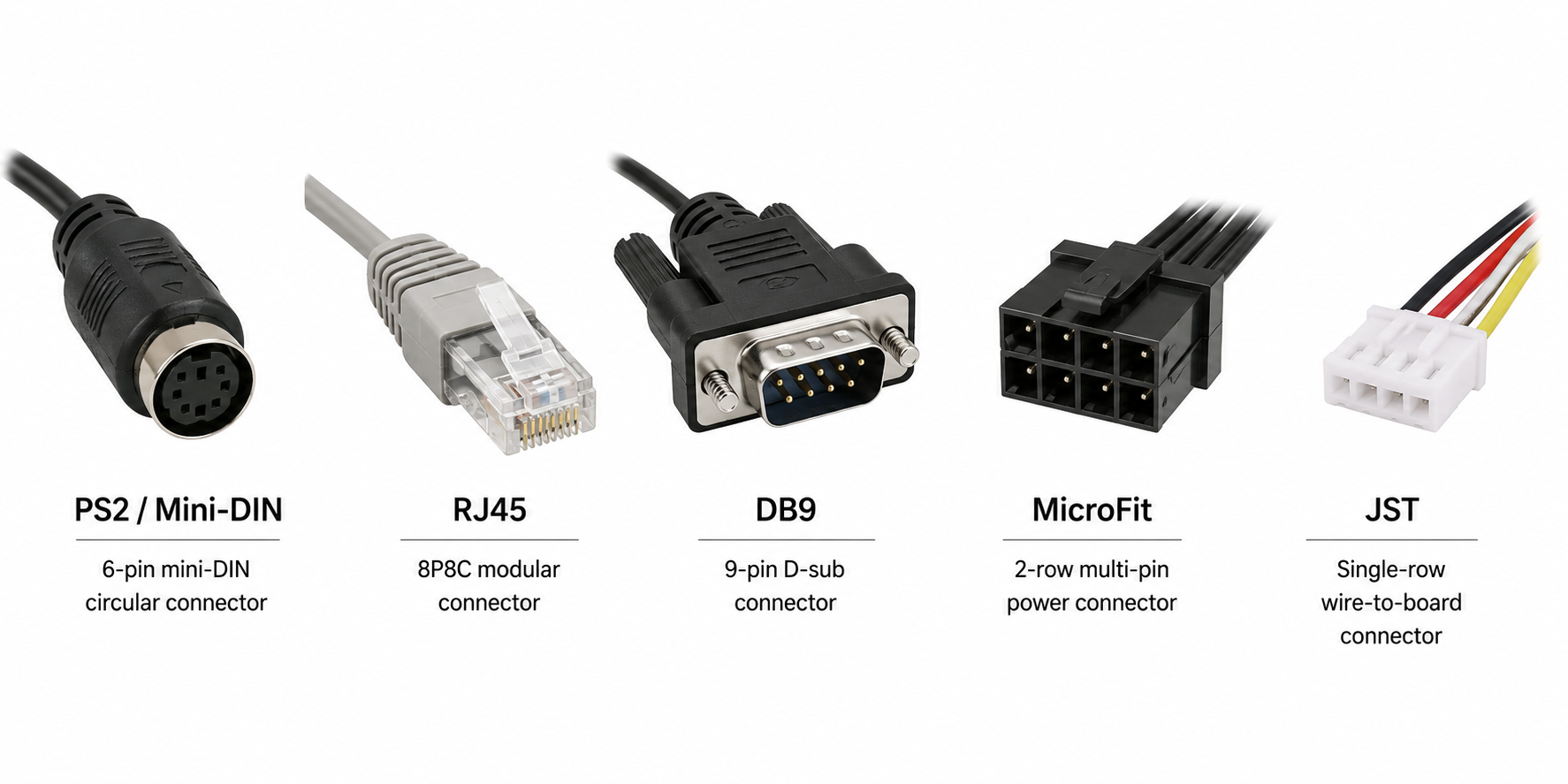
Many GNSS receivers are available with different connector options. PS2 / Mini-DIN is often the most common or default connector option because it is compact, practical, and can carry both power and serial signals.
Other connectors, such as RJ45, DB9, MicroFit, JST, or custom wiring harnesses, may be available depending on project requirements. However, non-default connector options or customized GPS receiver cable configurations may require a minimum order quantity (MOQ).

PS2 / Mini-DIN
PS2 / Mini-DIN is a round multi-pin connector commonly used on GNSS receivers. It is compact and can carry power plus serial signals in one connector. For many models, this may be the default or most readily available option.
RJ45
RJ45 looks like an Ethernet-style connector, but on a GNSS receiver it is not necessarily Ethernet. It may be used simply as a convenient multi-pin connector for power, TX, RX, and GND.
Unless the product specifically says it supports Ethernet, do not plug an RJ45 GNSS connector into a network port.
DB9
DB9 is the classic serial connector often associated with RS-232 equipment. It is familiar in industrial and legacy systems, but you should still check the interface type and pinout before connecting.
MicroFit
MicroFit connectors are compact locking connectors often used in industrial wiring harnesses. They are useful when vibration resistance and a secure connection are important.
JST
JST connectors are small board-level connectors commonly used in embedded electronics, compact devices, and custom wiring harnesses.
Default Connector, Customized Connector, and MOQ
For many GNSS receiver models, the default or most common option may be PS2 / Mini-DIN. This makes sense for general inventory because it is compact, flexible, and suitable for many applications.
However, industrial and OEM customers often need a different connector or cable configuration. A project may require RJ45, DB9, MicroFit, JST, a special cable length, a custom pinout, or a specific wiring harness.
In many cases, the factory can help customize the connector or cable configuration for the project. This is especially useful for system integrators, equipment manufacturers, and customers planning a larger deployment.
The important point is that custom connector or cable options may require MOQ, or minimum order quantity. This is because the factory may need to prepare special materials, arrange cable production, adjust assembly, and test the custom configuration.
For early evaluation, it is often practical to start with a default or in-stock model. After the interface, NMEA output, baud rate, and system requirements are confirmed, the connector and cable can be customized for production quantities.
Even when a connector can be customized, the electrical interface still matters. A customized cable does not change an RS-232 receiver into a TTL receiver unless the product is built or configured for that interface. Always confirm interface type, voltage level, pinout, and NMEA output requirements.
Adapters and Level Converters
Adapters can be useful, but it is important to understand what they actually do.
A USB to RS232 adapter is used when you want to connect an RS-232 GNSS receiver to a modern computer. This is common for testing, logging, or using mapping software.
A USB to TTL adapter is used when you want to connect a TTL GNSS receiver to a computer. It is commonly used for development and debugging with embedded receivers.
An RS232 to TTL level converter is used when one device uses RS-232 and the other uses TTL/UART. This is not just a connector adapter. It changes the voltage levels so the two devices can communicate safely.
Remember: some adapters only change the physical connector, while others perform voltage level conversion. For RS-232 vs TTL, voltage level conversion is often the critical part.

Common Mistakes to Avoid
Before connecting a GNSS receiver, avoid these common mistakes:
- Connecting TTL directly to RS-232
- Assuming connector type defines signal type
- Ignoring 3.3V vs 5V voltage levels
- Ignoring pinout
- Plugging an RJ45 GNSS connector into an Ethernet port
- Looking only at the product picture instead of the interface specification
- Buying TTL when the system needs RS-232, or buying RS-232 when the system needs TTL
- Reversing TX and RX
- Forgetting common ground on TTL/UART connections
- Assuming every connector option is in stock without checking MOQ for custom configurations
Buying Checklist Before Ordering
| Question | Why It Matters |
|---|---|
| Does your host device need RS-232 or TTL/UART? | This is the most important interface decision. |
| Is the voltage level 3.3V or 5V? | TTL devices must match the host voltage level. |
| Do you need to connect to a PC? | You may need a USB to RS232 adapter or USB to TTL adapter. |
| How long is the cable run? | RS-232 is usually better for longer cable runs. |
| Is the environment electrically noisy? | Industrial environments often favor RS-232. |
| Do you need IPX7, industrial temperature, or EMI shielding? | Field and industrial use may require rugged hardware. |
| What update rate do you need? | Models may support 1 Hz, 10 Hz, 18 Hz, 50 Hz, or higher. |
| Do you need L1, L1/L5 dual-band, or multi-band GNSS? | Accuracy and satellite coverage requirements vary by application. |
| Which connector do you need? | PS2, RJ45, DB9, MicroFit, and JST are different physical options. |
| Is the connector default or customized? | Custom connectors or cables may require MOQ. |
| Have you confirmed VCC, GND, TX, RX, and pinout? | Correct wiring is essential for safe communication. |
| Which NMEA sentences do you need? | Applications may require GGA, RMC, GSA, GSV, VTG, or other messages. |
GPSWebShop Product Examples
For industrial systems, data loggers, controllers, or longer cable installations, you can review GPSWebShop’s RS232 GNSS / GPS Receivers collection:
https://gpswebshop.com/collections/rs232-gnss-gps-receivers
Examples include:
- Navisys GR-M02 RS232 GNSS Receiver
- Navisys GR-U01 RS232 GNSS Receiver
- Navisys GR-8018R 50Hz RS232 GNSS Receiver
For microcontrollers, embedded boards, robotics, IoT, or custom PCB integration, you can review GPSWebShop’s TTL / UART GNSS / GPS Receivers collection:
https://gpswebshop.com/collections/ttl-uart-gnss-gps-receivers
Examples include:
- Navisys GR-M02S TTL GNSS Receiver
- Navisys GR-U01T TTL GNSS Receiver
- Navisys GR-8018T 50Hz TTL GNSS Receiver
- Columbus P-70 Ultra Precise GNSS Receiver
For many models, PS2 / Mini-DIN may be the common default connector option. If your project requires RJ45, DB9, MicroFit, JST, a custom cable, or a special pinout, contact GPSWebShop to confirm availability, lead time, and minimum order quantity.
Conclusion
RS-232 and TTL can both carry GNSS serial output such as NMEA data, but they are built for different integration environments.
RS-232 is usually the safer choice for industrial equipment, data loggers, controllers, longer cable runs, and field systems. TTL/UART is usually the cleaner choice for microcontrollers, embedded boards, robotics, IoT, and short internal connections.
The main takeaway is worth repeating: output type is not the same as connector type. RS-232 and TTL describe the electrical interface. PS2, RJ45, DB9, MicroFit, and JST describe the physical connector. Pinout defines what each pin does.
Before ordering a GNSS receiver, confirm the interface type, voltage level, connector, pinout, adapter requirements, NMEA output, and whether a custom connector requires MOQ. That small check can prevent a lot of troubleshooting later.