

Many non-USB GNSS receiver integrations use either RS-232 or TTL/UART. Both can carry GNSS data such as NMEA sentences, but they use different electrical signaling and are intended for different host systems.
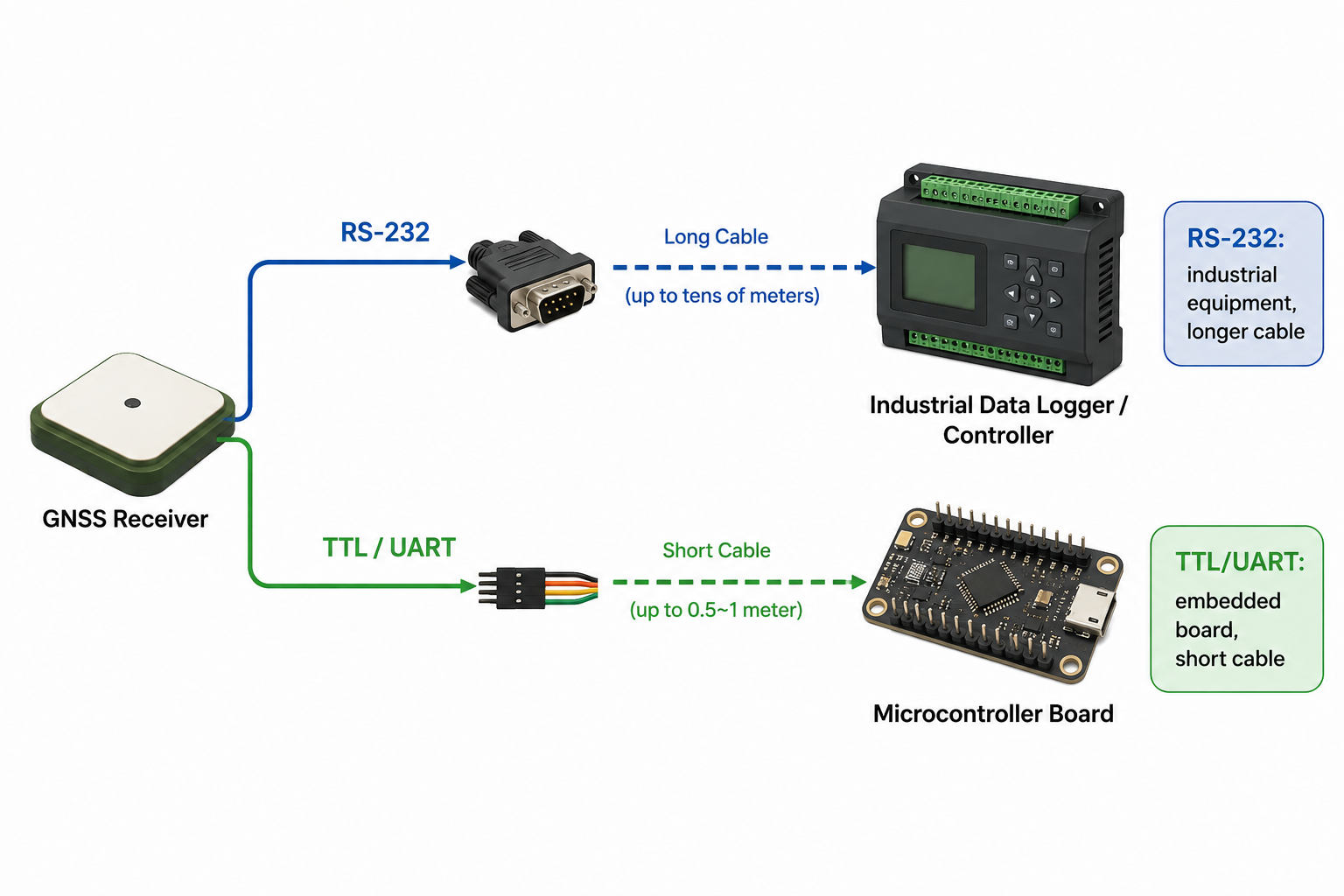
What RS-232 and TTL Mean
RS-232 is a serial communication interface commonly used by industrial equipment, data loggers, controllers, and older professional systems. Classic RS-232 signaling does not use 3.3V or 5V logic levels. A valid RS-232 signal is typically negative voltage for logic 1 and positive voltage for logic 0, commonly within about ±3V to ±15V depending on the device.
TTL/UART is logic-level serial communication, commonly found on microcontrollers, embedded boards, and custom electronics. TTL signals are usually 3.3V or 5V, so the voltage level must match the host board before wiring.
Both interfaces can carry similar GNSS data, such as NMEA sentences. The difference is not the GPS data itself; the difference is the electrical format your existing system expects.
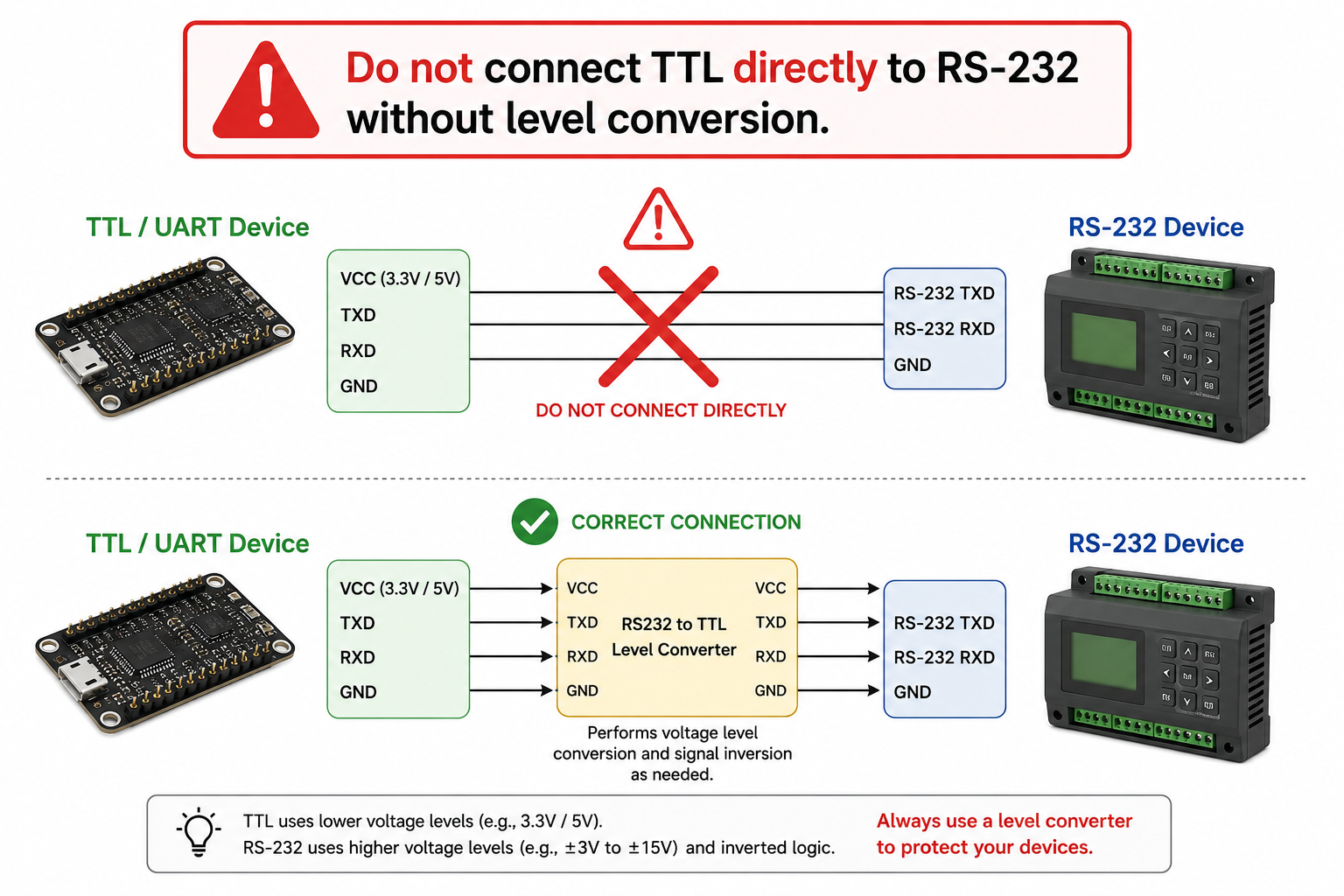
Important: do not use the wrong receiver type just because the connector looks similar. TTL should not be connected directly to RS-232. The voltage levels are different and may damage the device.
Match the Receiver Interface
| If your host system has… | RS-232 GNSS Receiver | TTL / UART GNSS Receiver |
|---|---|---|
| Typical host system | Industrial systems, data loggers, controllers, vehicle or marine electronics | Microcontrollers, embedded boards, custom PCBs, robotics, IoT devices |
| Signal type | RS-232 serial | Logic-level UART serial |
| Voltage level | Typically about ±3V to ±15V signaling, depending on the device | Usually 3.3V or 5V logic level |
| Cable distance | Better for longer cable runs | Best for short cable runs |
| For PC testing | Usually needs a USB to RS232 adapter | Usually needs a USB to TTL adapter |
| Connecting to UART pins | Needs an RS232 to TTL level converter | Can connect directly if voltage and pinout match |
| Main risk | Can damage TTL inputs if connected directly | Can be damaged by RS-232 voltage |
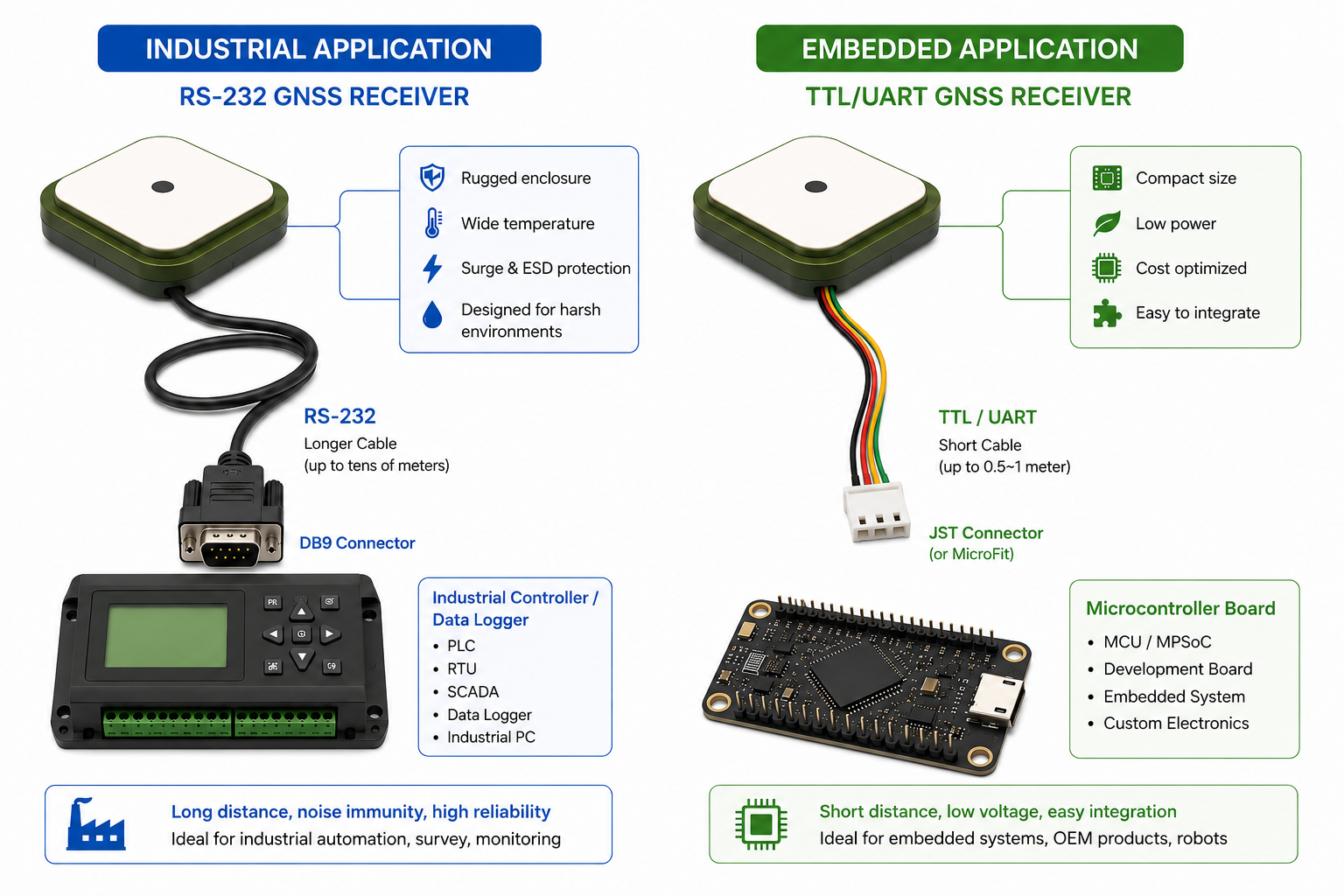
NMEA Output Is Separate from the Interface
RS-232 and TTL describe how data is electrically transmitted. They do not decide what GNSS data exists inside the receiver.
Many GNSS receivers can output the same common NMEA sentences over either RS-232 or TTL/UART, such as GGA, RMC, GSA, GSV, VTG, and TXT. The interface type mainly decides how the data electrically reaches your existing host device.
The actual NMEA messages, baud rate, update rate, and default configuration still depend on the receiver model and settings. If your software requires GGA and RMC at a certain rate, check the product specification before ordering.
Connectors, Pinout, and Custom Options
This is the most common point of confusion when replacing or sourcing a receiver for an existing system: RS-232 and TTL/UART are interface types. PS2 / Mini-DIN, RJ45, DB9, MicroFit, and JST are connector types.
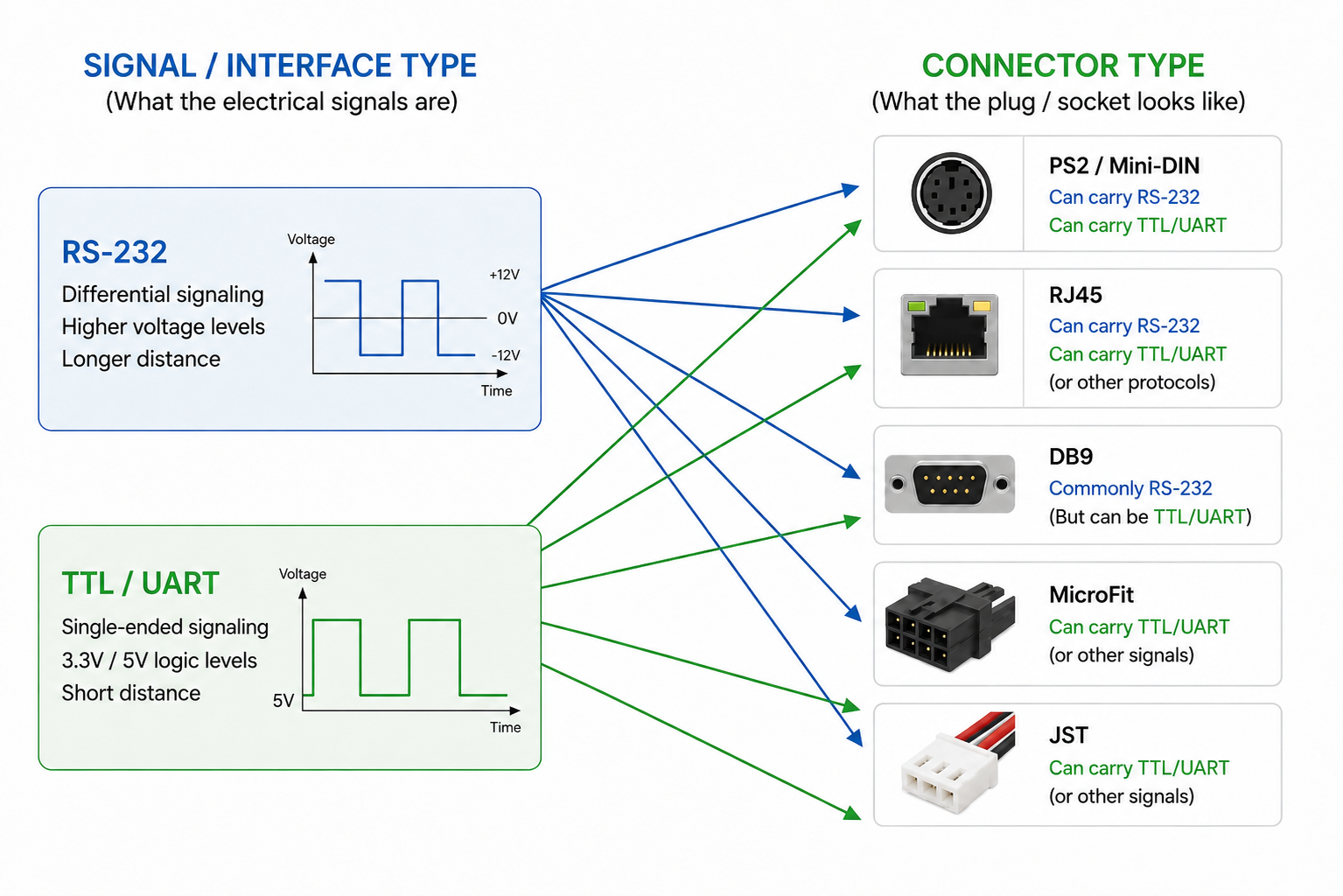
- PS2 / Mini-DIN: common default option for many GNSS receivers; compact and able to carry power plus serial signals.
- RJ45: looks like Ethernet, but on a GNSS receiver it may simply carry power, TX, RX, and GND. Do not plug it into a network port unless the product specifically says Ethernet.
- DB9: commonly associated with RS-232, but still check the actual pinout.
- MicroFit: useful for locking wire harnesses and vibration-resistant installations.
- JST: common for embedded electronics and compact internal wiring.
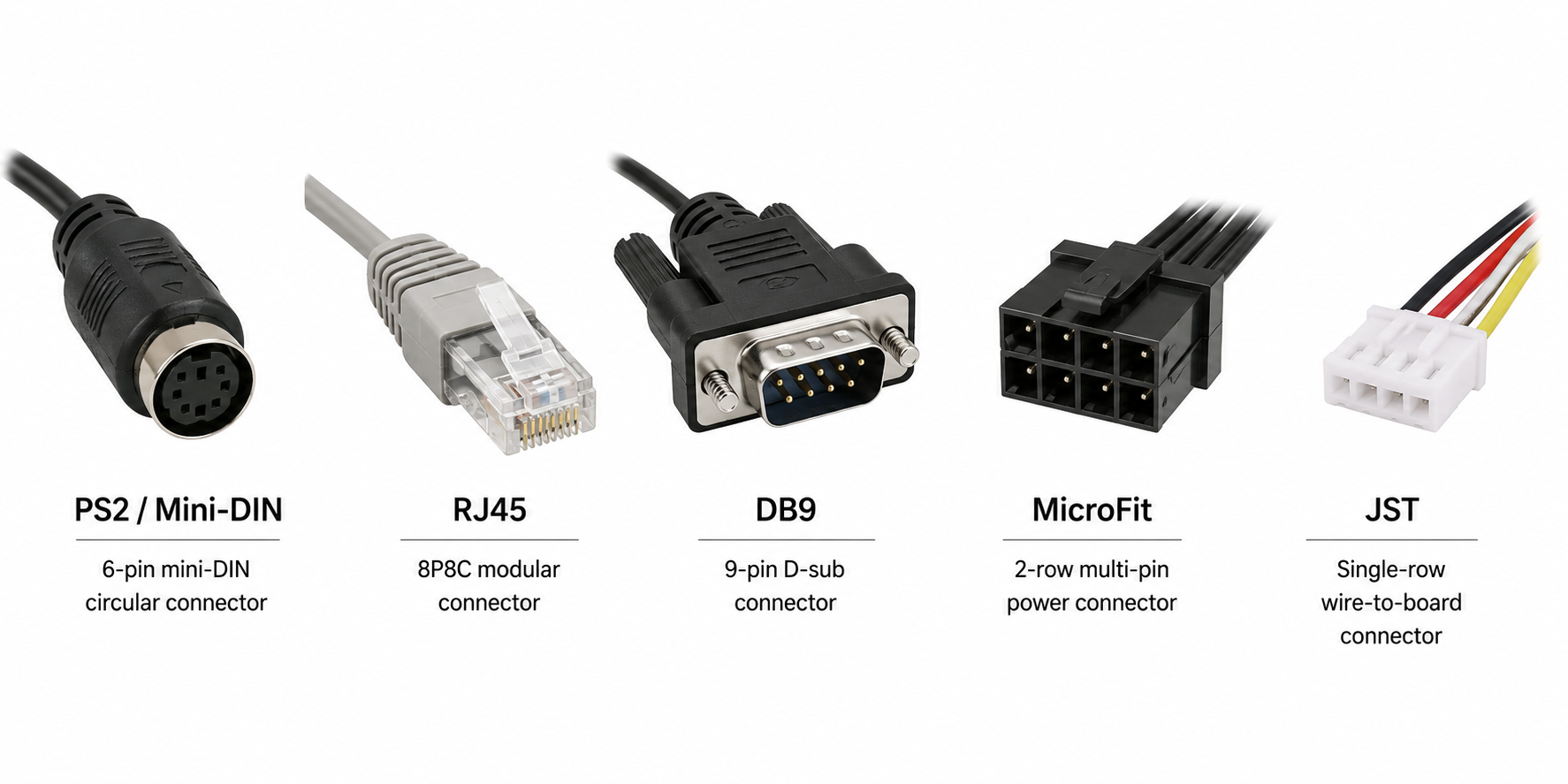
For many models, PS2 / Mini-DIN is the most common or default connector option. If your existing system requires RJ45, DB9, MicroFit, JST, a special cable length, or a specific pinout, custom connector or cable configurations may be available, but they may require MOQ, or minimum order quantity.
Adapters and Level Conversion
Adapters are useful, but not all adapters do the same job.
- USB to RS232 adapter: connects an RS-232 GNSS receiver to a modern computer.
- USB to TTL adapter: connects a TTL GNSS receiver to a computer for testing or development.
- RS232 to TTL level converter: safely converts between RS-232 voltage and TTL/UART logic level.
A connector adapter only changes the plug shape. A level converter changes the electrical signal. If the receiver interface does not match the existing system, the correct level conversion may be required.
Buying Checklist
| Check This | Why It Matters |
|---|---|
| Existing host interface | Confirm whether the system expects RS-232 or TTL/UART before selecting the receiver. |
| Voltage level | TTL devices must match the host logic level, usually 3.3V or 5V. |
| Pinout | Confirm VCC, GND, TX, RX, and any special pins before wiring. |
| PC testing | Use the adapter that matches the receiver interface: USB to RS232 or USB to TTL. |
| Cable length and noise | Longer or noisier environments usually favor RS-232. |
| NMEA messages | Confirm required messages such as GGA, RMC, GSA, GSV, or VTG. |
| Connector availability | Default connectors may be in stock; custom cables may require MOQ. |
GPSWebShop Product Examples
If your existing equipment requires RS-232, review GPSWebShop’s RS232 GNSS / GPS Receivers collection:
https://gpswebshop.com/collections/rs232-gnss-gps-receivers
- Navisys GR-M02 RS232 GNSS Receiver
- Navisys GR-U01 RS232 GNSS Receiver
- Navisys GR-8018R 50Hz RS232 GNSS Receiver
If your existing board or product requires TTL/UART, review GPSWebShop’s TTL / UART GNSS / GPS Receivers collection:
https://gpswebshop.com/collections/ttl-uart-gnss-gps-receivers
- Navisys GR-M02S TTL GNSS Receiver
- Navisys GR-U01T TTL GNSS Receiver
- Navisys GR-8018T 50Hz TTL GNSS Receiver
- Columbus P-70 Ultra Precise GNSS Receiver
Conclusion
RS-232 and TTL/UART can both carry GNSS serial output such as NMEA data, but they are built for different host interfaces.
For most customers, the job is not to choose an interface from scratch. The existing system already uses RS-232 or TTL/UART. The job is to select a GNSS receiver that matches that interface.