
Why is my BL-1000ST emitting a constant high-pitched noise?

Quote from anonymous on July 2, 2026, 9:56 amWe have installed a new, fully charged battery in the BL-1000ST. When we power on the unit, the LEDs cycle through their normal startup sequence. However, after startup, the bottom LED and the LED above the satellite connection indicator remain illuminated, and the unit emits a constant high-pitched noise.
Please see the attached photo/video for reference.
We have installed a new, fully charged battery in the BL-1000ST. When we power on the unit, the LEDs cycle through their normal startup sequence. However, after startup, the bottom LED and the LED above the satellite connection indicator remain illuminated, and the unit emits a constant high-pitched noise.
Please see the attached photo/video for reference.
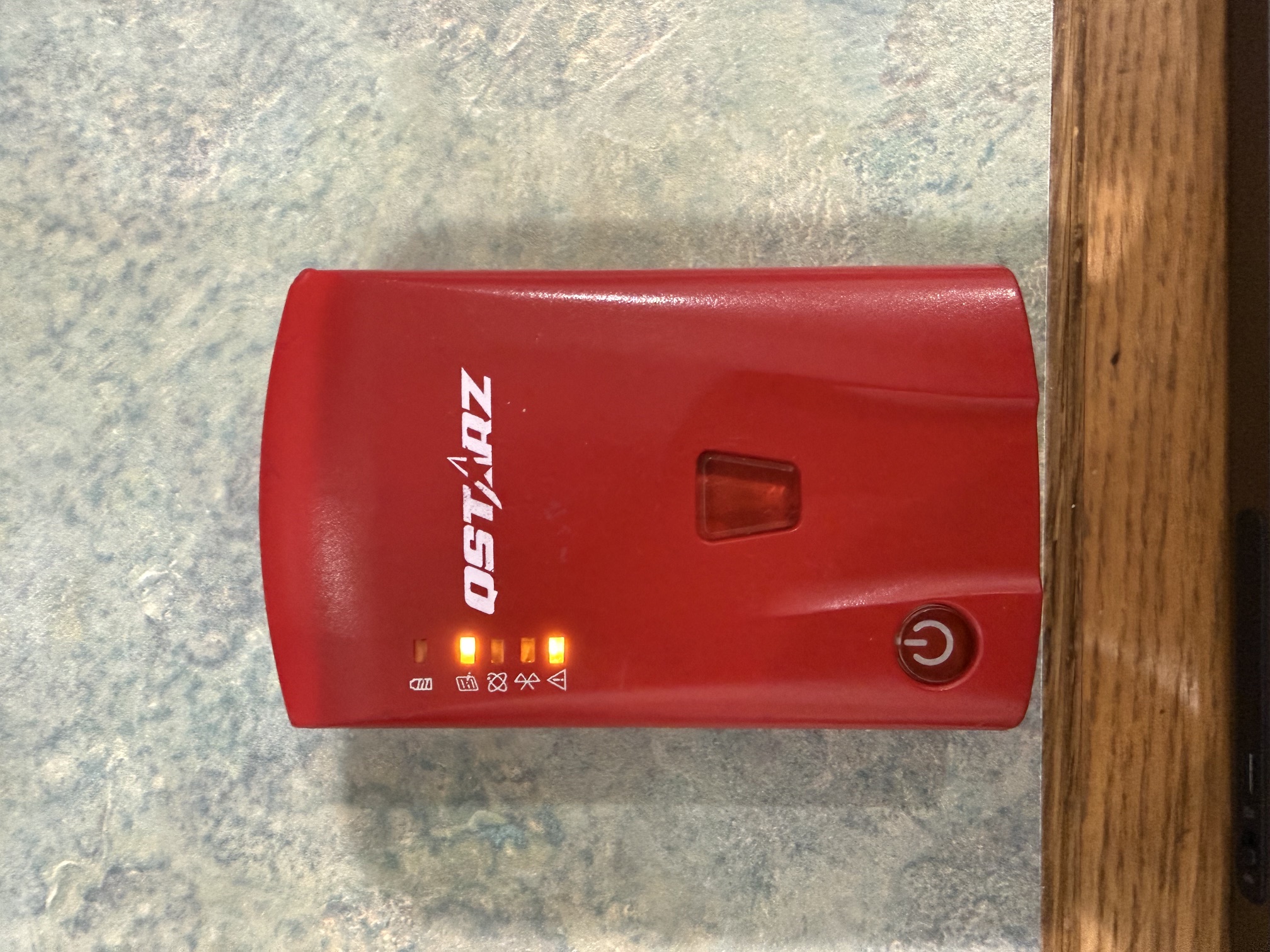

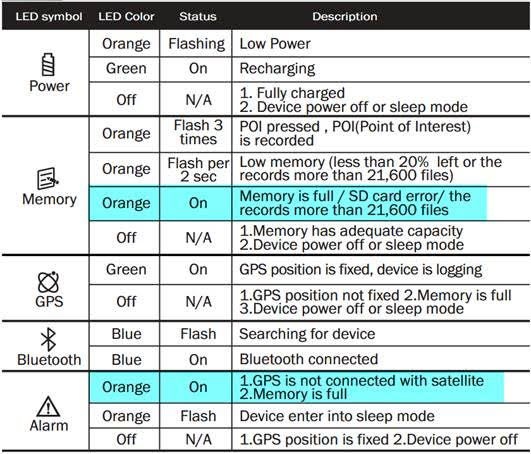
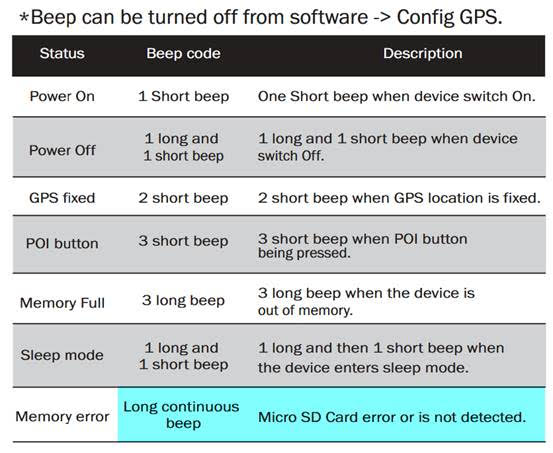
Quote from GPSWebShop Official on July 2, 2026, 9:59 amBased on your description of the LED indicator and buzzer (bottom light and the one above the satellite connect light remain on, and the unit emits a constant high pitched noise.), the problem is likely a memory error.
You can refer to the following Quick Start Guide (QSG) for the definitions of the LED indicator and Beeper.
【https://www.qstarz.com/download/BL-1000ST_QSG_EN_Ver_D.pdf】
Please try removing the micro SD card and formatting it. Please refer to the instructions below for formatting instructions.
https://www.qstarz.com/FAQs/Operation%20process%20of%20SD%20card%20maintenance-EN.pdf
**Important:** Formatting will erase all data on the memory card. Please proceed with caution and only after confirming the correct procedure.
After formatting, please reinsert the micro SD card into the device and power it on to check if it functions correctly. If it still does not function correctly, the micro SD card may be damaged and unusable.
Please let us know how your micro SD card is used after formatting.
Based on your description of the LED indicator and buzzer (bottom light and the one above the satellite connect light remain on, and the unit emits a constant high pitched noise.), the problem is likely a memory error.
You can refer to the following Quick Start Guide (QSG) for the definitions of the LED indicator and Beeper.
【https://www.qstarz.com/download/BL-1000ST_QSG_EN_Ver_D.pdf】
Please try removing the micro SD card and formatting it. Please refer to the instructions below for formatting instructions.
https://www.qstarz.com/FAQs/Operation%20process%20of%20SD%20card%20maintenance-EN.pdf
**Important:** Formatting will erase all data on the memory card. Please proceed with caution and only after confirming the correct procedure.
After formatting, please reinsert the micro SD card into the device and power it on to check if it functions correctly. If it still does not function correctly, the micro SD card may be damaged and unusable.
Please let us know how your micro SD card is used after formatting.