How to Turn UDR (Untethered Dead Reckoning) On or Off on the GR-8018?

Quote from GPSWebShop Official on May 28, 2026, 10:24 amThe GR-8018 is designed with the u-blox NEO-M9V chipset. Users can enable or disable the UDR function by using u-blox configuration commands.
According to the document “NEO-M9V Integration Manual UBX-21029776”:
https://content.u-blox.com/sites/default/files/NEO-M9V_IntegrationManual_UBX-21029776.pdf
Section 3.2.6 MDR System Configuration
Section 3.2.6.1 Enabling/Disabling Fusion FilterThe MDR feature can be enabled or disabled using the
CFG-SFCORE-USE_SFkey.If MDR is disabled, the receiver will output a GNSS-only solution. However, IMU sensor measurements will still be available in the
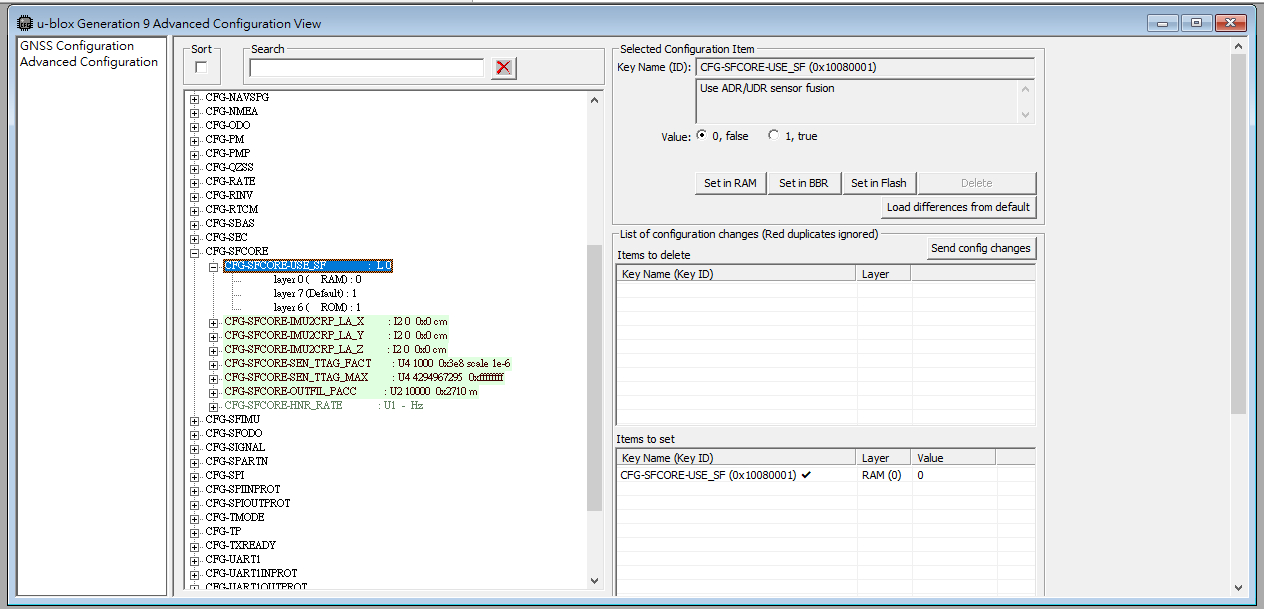
UBX-ESF-MEASandUBX-ESF-RAWmessages.To change this configuration using u-center(which can be downloaded from ublox website), please refer to the screenshot below.
The GR-8018 is designed with the u-blox NEO-M9V chipset. Users can enable or disable the UDR function by using u-blox configuration commands.
According to the document “NEO-M9V Integration Manual UBX-21029776”:
https://content.u-blox.com/sites/default/files/NEO-M9V_IntegrationManual_UBX-21029776.pdf
Section 3.2.6 MDR System Configuration
Section 3.2.6.1 Enabling/Disabling Fusion Filter
The MDR feature can be enabled or disabled using the CFG-SFCORE-USE_SF key.
If MDR is disabled, the receiver will output a GNSS-only solution. However, IMU sensor measurements will still be available in the UBX-ESF-MEAS and UBX-ESF-RAW messages.
To change this configuration using u-center(which can be downloaded from ublox website), please refer to the screenshot below.